Latest Post

Blogs

Digital Marketing Strategy Desk (1)

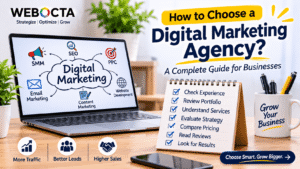
How to Choose a Digital Marketing Agency: A Complete Guide for Businesses

In today’s competitive digital world, having an online presence is essential for every business. Whether you run a startup, small business, or established company, digital marketing can help you reach potential customers, increase brand awareness, and generate quality leads. However, achieving successful results requires the right strategy, expertise, and execution.

This is where a professional digital marketing agency can make a difference. But with so many agencies offering different services, choosing the right one can be challenging.

In this blog, we will explore the important factors to consider when choosing a digital marketing agency for your business.

What Is a Digital Marketing Agency?

A digital marketing agency helps businesses promote their products and services through online channels. These agencies use different marketing strategies to improve brand visibility, attract website visitors, generate leads, and increase sales.

Common digital marketing services include:

  • Search Engine Optimization (SEO)
  • Social Media Marketing (SMM)
  • Pay-Per-Click Advertising (PPC)
  • Content Marketing
  • Website Design and Development
  • Email Marketing
  • Online Reputation Management

Choosing an agency that understands your business goals can help you build a stronger digital presence.

1. Understand Your Business Goals

Before selecting a digital marketing agency, identify what you want to achieve.

Different businesses have different marketing requirements. Some want to increase website traffic, while others focus on generating leads, improving brand awareness, or increasing online sales.

Ask yourself:

  • Do you want better Google search rankings?
  • Are you looking to generate more enquiries?
  • Do you want to improve social media engagement?
  • Do you need a new business website?
  • Are you planning to increase online sales?

Having clear objectives will help you identify an agency that offers the right services for your requirements.

2. Check the Agency’s Experience and Expertise

Experience is an important factor when choosing a digital marketing agency. An agency with relevant industry knowledge may better understand your target audience, market competition, and marketing challenges.

Review the agency’s website, portfolio, previous projects, and service expertise.

Check whether the team has experience in areas such as SEO, website development, paid advertising, and content marketing.

You should also ask whether they have worked with businesses similar to yours. Relevant experience can help an agency develop strategies that match your industry and business objectives.

3. Review Their Portfolio and Case Studies

A professional digital marketing agency should be able to demonstrate its previous work.

Review its portfolio and case studies to understand the type of projects it has handled and the results it has achieved.

Look for examples of:

  • Website design and development projects
  • SEO performance improvements
  • Successful advertising campaigns
  • Social media growth
  • Lead generation campaigns
  • Content marketing projects

Pay attention to measurable results rather than attractive presentations alone. Genuine performance data can help you evaluate the agency’s capabilities.

4. Understand the Services They Offer

Not every business needs every digital marketing service. Therefore, choose an agency that provides services relevant to your current and future requirements.

For example, if your goal is to improve organic website traffic, SEO and content marketing may be important. If you want immediate visibility for specific products or services, PPC advertising may also be useful.

Working with an agency that offers multiple digital marketing services can make it easier to coordinate your marketing activities under one strategy.

5. Check Their SEO Knowledge and Strategy

SEO is one of the most important long-term digital marketing strategies for businesses.

A reliable agency should understand keyword research, technical SEO, on-page optimization, off-page SEO, local SEO, and content optimization.

Before hiring an agency, ask how it plans to improve your website’s organic visibility.

A professional agency should explain its approach clearly and avoid guaranteeing specific Google rankings. Search engine rankings depend on several factors and cannot be guaranteed.

Focus on agencies that prioritize sustainable SEO practices and useful content.
6. Evaluate Communication and Transparency

Good communication is essential for a successful relationship with a digital marketing agency.

The agency should clearly explain its strategies, project timelines, campaign performance, and expected deliverables.

Before making a decision, understand:

  • How frequently will you receive updates?
  • Who will manage your project?
  • How will campaign performance be reported?
  • How can you contact the team?
  • What happens if changes are required?

Choose an agency that values transparency and keeps you informed throughout the process.

7. Compare Pricing and Service Packages

Budget is another important consideration when selecting a digital marketing agency.

Different agencies offer different pricing structures depending on their experience, services, campaign complexity, and business requirements.

Do not choose an agency based only on the lowest price. Instead, compare the services included in each package and understand what you will receive.

Ask for a clear breakdown of costs, deliverables, additional charges, and contract conditions.

The right agency should provide services that match your budget while supporting your business goals.

8. Look for Customized Marketing Strategies

Every business is different, so a single marketing strategy cannot deliver the same results for everyone.

A professional digital marketing agency should first understand your business, industry, competitors, audience, and objectives.

Based on this information, it should create a customized marketing plan.

Avoid agencies that offer identical strategies to every client without understanding their individual requirements.

A personalized approach can help businesses use their marketing budgets more effectively.

9. Read Client Reviews and Testimonials

Client reviews can provide valuable insights into an agency’s professionalism, communication, service quality, and reliability.

Check testimonials on Google Business Profile, social media platforms, and independent review websites.

Look for feedback about project management, campaign performance, customer support, and overall experience.

You can also request references or examples of previous client work when appropriate.

10. Measure Performance and Results

A successful digital marketing campaign should be monitored and improved regularly.

Before starting a project, ask the agency which performance indicators it will track.

Important digital marketing metrics include:

  • Website traffic
  • Keyword rankings
  • Organic search clicks and impressions
  • Lead generation
  • Conversion rates
  • Social media engagement
  • Advertising return on investment

Regular reporting helps you understand what is working and where improvements are needed.

Conclusion

Choosing the right digital marketing agency is an important decision that can influence your business’s online growth. From SEO and social media marketing to website development and paid advertising, the right agency can help you build a strong digital presence and reach your target audience.

Before making your final decision, evaluate the agency’s experience, portfolio, services, communication, pricing, and marketing approach.

Remember, the best digital marketing agency is not necessarily the cheapest or the biggest. It is the one that understands your business goals & growth in the long term, develops the right strategy, and works consistently toward measurable results.
Shopify Website Development Banner (1)

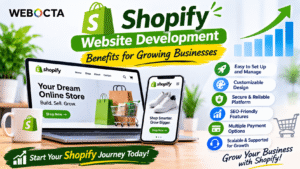
Shopify Website Development: Benefits for Growing Businesses

In today’s digital world, having an online store is essential for businesses that want to reach more customers and increase sales. With the rapid growth of e-commerce, customers prefer shopping online because it is convenient, fast, and accessible. However, building a successful online store requires the right platform, professional design, and effective functionality.

Shopify Website Development is a popular solution for businesses looking to establish and grow their online presence. Shopify provides powerful e-commerce tools that make it easier to create, manage, and scale an online store without requiring extensive technical knowledge.

In this blog, we will explore the major benefits of Shopify website development and why it is a smart investment for growing businesses.

What Is Shopify Website Development?

Shopify is an e-commerce platform that allows businesses to create and manage online stores. It provides everything needed to sell products online, including website design tools, product management, payment integration, inventory management, and order processing.

Shopify website development involves creating a professional online store that reflects your brand identity and provides a smooth shopping experience.

Whether you are launching a new business or expanding an existing one, Shopify offers flexible solutions for different business requirements.

1. Easy to Set Up and Manage

One of the biggest advantages of Shopify is its user-friendly interface. Unlike traditional website development platforms that may require technical expertise, Shopify makes it easier to manage an online store.

Business owners can add products, update descriptions, manage orders, track inventory, and monitor sales through a centralized dashboard.

This saves time and allows businesses to focus more on marketing, customer service, and growth instead of dealing with complicated technical tasks.

2. Professional and Customizable Website Design

Your website design creates the first impression of your brand. A professional and visually appealing online store helps build customer trust and encourages visitors to explore your products.

Shopify offers various customizable themes that businesses can use to create attractive storefronts.

Professional Shopify development can further improve your website through:

  • Custom website layouts
  • Brand-specific colors and typography
  • Attractive product pages
  • Easy navigation
  • Professional homepage design
  • Customized shopping experiences

A well-designed Shopify website helps your business stand out from competitors and create a consistent brand identity.

3. Mobile-Friendly Shopping Experience

A large number of online shoppers use smartphones to browse products and complete purchases. Therefore, having a mobile-friendly e-commerce website is essential.

Shopify themes are generally designed to support responsive layouts, allowing your online store to adapt to different screen sizes.

A mobile-friendly website makes it easier for customers to browse products, view images, add items to their carts, and complete purchases.

It also supports a better user experience and helps your business serve customers across different devices.

4. Secure and Reliable E-commerce Platform

Security is an important consideration for every online business. Customers need to feel confident when sharing personal information and making payments through your website.

Shopify provides managed hosting and security features, including SSL certificates and platform-level security protections.

It also supports secure payment integrations and helps businesses manage online transactions.

A secure shopping environment builds customer confidence and helps protect important business and customer information.

5. SEO-Friendly Features for Better Online Visibility

Having an online store is not enough if potential customers cannot find it through search engines.

Shopify provides several SEO-friendly features that help businesses optimize their online stores for search visibility.

Important Shopify SEO practices include:

  • Optimizing page titles and meta descriptions
  • Creating SEO-friendly product URLs
  • Adding descriptive image alt text
  • Writing unique product descriptions
  • Using internal linking
  • Creating helpful blog content
  • Optimizing website loading performance

With the right SEO strategy, businesses can improve their chances of attracting relevant organic traffic from Google and other search engines.

6. Multiple Payment Gateway Integrations

A smooth checkout experience is essential for successful online sales.

Shopify supports multiple payment options, allowing businesses to offer convenient payment methods to customers.

Depending on the country and available integrations, payment options may include credit cards, debit cards, digital wallets, and third-party payment providers.

Providing suitable payment options can make the purchasing process easier and help reduce unnecessary checkout friction.

7. Easy Inventory and Order Management

Managing products and orders can become challenging as a business grows.

Shopify provides inventory and order management features that help business owners track available products, process customer orders, and manage fulfilment activities.

Businesses can monitor inventory levels, update product availability, and organize orders from one dashboard.

These features help reduce manual work and make daily e-commerce operations more efficient.

8. Scalable Solutions for Growing Businesses

Every business wants to grow, but its website should be ready to handle increasing demands.

Shopify offers different plans, features, and integrations to support businesses as their requirements change.

Whether you operate a small online store or manage a larger e-commerce business, Shopify provides options to expand your product catalogue, integrate additional applications, and improve store functionality.

This flexibility makes Shopify a suitable platform for businesses planning long-term online growth.

9. Powerful Marketing and App Integrations

Marketing plays an important role in attracting customers and generating online sales.

Shopify supports integrations with various marketing tools and applications that help businesses improve their promotional activities.

You can integrate tools for:

  • Email marketing
  • Social media marketing
  • Search engine optimization
  • Customer reviews
  • Discount campaigns
  • Analytics and reporting
  • Customer relationship management

These integrations help businesses create more effective marketing campaigns and build stronger relationships with customers.

10. Better Customer Experience and Sales Opportunities

A successful online store should make shopping simple and convenient.

Shopify allows businesses to create organized product categories, detailed product pages, easy navigation, and streamlined checkout experiences.

Features such as product recommendations, customer reviews, discount codes, and automated notifications can further improve the shopping journey.

A positive customer experience encourages visitors to explore your store, make purchases, and return for future shopping.

Why Choose Professional Shopify Website Development?

Although Shopify provides ready-made themes and tools, professional development can help businesses create a more customized and effective online store.

An experienced Shopify development team can understand your business requirements, design a suitable storefront, configure essential features, integrate payment solutions, and optimize the website for performance and SEO.

Professional development ensures that your online store reflects your brand identity while providing a smooth experience for customers.

Conclusion

Shopify website development offers several advantages for businesses looking to establish and expand their e-commerce presence. From professional website design and mobile responsiveness to secure payments, SEO features, and scalable functionality, Shopify provides the tools needed to build a successful online store.

However, long-term success depends on more than choosing the right platform. Your website should also offer a great user experience, quality products, effective marketing, and reliable customer support.

Investing in professional Shopify website development can help your business reach more customers, improve online sales opportunities, and build a stronger digital presence.

If you are planning to launch or upgrade your online store, Shopify can be a powerful platform to support your business growth.

On-Page SEO and Conversion Guide (1)

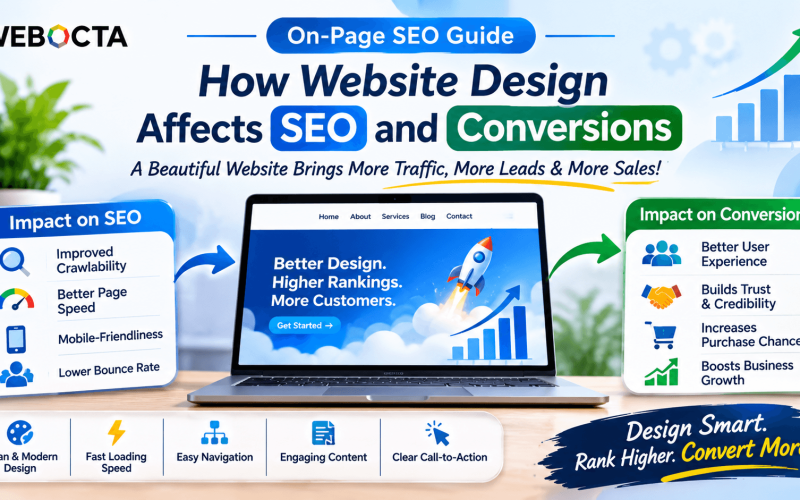
How Website Design Affects SEO and Conversions: A Complete Guide

A website is more than just an online presence for your business. It is an important tool for attracting visitors, building trust, generating leads, and increasing sales. However, having an attractive website alone is not enough. Your website design also plays an important role in search engine optimization (SEO) and conversion rates.

A well-designed website provides a smooth user experience, helps visitors find information quickly, and makes it easier for search engines to understand your content. In this blog, we will explore how website design affects SEO and conversions and why businesses should invest in a user-friendly website.

What Is the Connection Between Website Design, SEO, and Conversions?

Website design refers to the visual appearance, layout, structure, and functionality of a website. SEO focuses on improving your website’s visibility in search engine results, while conversion optimization aims to encourage visitors to take meaningful actions.

These three elements work together.

For example, a website with clear navigation, fast loading speed, mobile-friendly layouts, and helpful content can provide a better experience for visitors. This can support SEO efforts and make it easier for potential customers to contact your business, request a quote, or purchase a product.

1. Website Loading Speed Improves User Experience

Website speed is an important factor in creating a positive browsing experience. Visitors may leave if a website takes too long to load, especially when accessing it through mobile devices or slower internet connections.

Page experience and Core Web Vitals are important considerations for modern website performance.

To improve website speed:

  • Compress and optimize images.
  • Use efficient website hosting.
  • Minimize unnecessary scripts and plugins.
  • Enable browser caching where appropriate.
  • Optimize CSS and JavaScript files.
  • Use a content delivery network when beneficial.

A faster website helps visitors access information more easily and can support better engagement and conversions.

2. Mobile-Friendly Design Is Essential

Many people browse websites using smartphones and tablets. Therefore, your website should work smoothly across different screen sizes.

A responsive website automatically adjusts its layout according to the device being used.

Important mobile-friendly design practices include:

  • Use responsive layouts.
  • Make text easy to read.
  • Keep navigation simple.
  • Use appropriately sized buttons.
  • Avoid unnecessary pop-ups.
  • Ensure images fit mobile screens.

Google primarily uses the mobile version of website content for indexing, making mobile usability an important part of an effective SEO strategy.

3. Easy Navigation Helps Visitors Find Information

Website navigation directly affects how visitors explore your website. If users cannot find important information quickly, they may leave without taking action.

Create a simple navigation structure with clearly labeled sections such as Home, About Us, Services, Blog, and Contact Us.

Use descriptive menu labels and organize related pages logically.

For example, a digital marketing company can organize its services into SEO, social media marketing, website development, PPC advertising, and content marketing.

Good navigation improves usability and helps search engines discover important pages through internal links.

4. Attractive Design Builds Trust and Credibility

First impressions matter when visitors land on your website. A clean, professional, and consistent design can help establish trust in your business.

Use a consistent color scheme, readable typography, professional images, and clear layouts.

Include important trust-building elements such as:

  • Customer testimonials
  • Client reviews
  • Business information
  • Case studies
  • Certifications and achievements
  • Contact details

A trustworthy website can make potential customers more comfortable interacting with your business.

5. High-Quality Content Supports SEO

Website design and content should work together. Even the most attractive website may struggle to engage visitors if it does not provide useful information.

Create informative content that answers your audience’s questions and explains your products or services clearly.

Use relevant keywords naturally in page titles, headings, descriptions, URLs, and body content.

Organize information using short paragraphs, bullet points, and descriptive headings. This improves readability and helps visitors understand your offerings.

6. Clear Call-to-Action Buttons Increase Conversions

A call-to-action (CTA) encourages visitors to take the next step.

Examples include:

  • Contact Us
  • Get a Free Quote
  • Book a Consultation
  • Request a Demo
  • Buy Now
  • Learn More

Place CTAs in visible and relevant sections of your website. Use clear, action-oriented language and make buttons easy to identify.

Avoid overwhelming visitors with too many competing calls to action. Focus on the primary action you want them to complete.

7. SEO-Friendly Website Structure Improves Discoverability

A well-organized website makes it easier for search engines to crawl and understand your pages.

Important website structure practices include:

  • Create a logical page hierarchy.
  • Use descriptive URLs.
  • Implement internal linking.
  • Add XML sitemaps.
  • Fix broken links.
  • Use appropriate heading tags.
  • Implement relevant structured data.

A strong website structure supports better content discovery and helps users navigate between related pages.

8. Image Optimization Improves Performance

Images make websites visually appealing and help explain products and services. However, large image files can slow down page loading.

Optimize images by compressing files, choosing appropriate formats such as WebP, and using suitable image dimensions.

Add descriptive alt text to meaningful images so that their content can be understood by assistive technologies and search engines.

Avoid using unnecessarily large images that affect website performance.

9. Simple Forms Generate More Leads

Contact forms are essential for businesses that want to generate enquiries through their websites.

However, complicated forms can discourage visitors from completing them.

Keep forms simple by requesting only necessary information, such as name, email address, phone number, and enquiry details.

Use clear labels, helpful error messages, and a visible submit button.

A simple and accessible form can make it easier for potential customers to connect with your business.

10. Monitor Website Performance and Improve Regularly

Website optimization should be an ongoing process. Regularly monitor how visitors interact with your website and identify areas that need improvement.

Useful tools include Google Analytics 4, Google Search Console, and PageSpeed Insights.

Track important metrics such as:

  • Organic website traffic
  • Search impressions and clicks
  • Page loading performance
  • User engagement
  • Enquiry submissions
  • Conversion rates

Use this information to improve website design, content, navigation, and calls to action.

Conclusion

Website design has a significant impact on how visitors experience your business online. A fast, responsive, attractive, and easy-to-navigate website can support SEO efforts while helping convert visitors into potential customers.

From mobile-friendly layouts and optimized images to clear navigation and effective call-to-action buttons, every design element contributes to the overall website experience.

Remember, a successful website is not just about looking good. It should also perform well, rank effectively, and generate business results.

Investing in professional website design and SEO optimization can help your business improve online visibility, attract relevant visitors, build credibility, and achieve long-term digital growth.

Content Marketing Strategies That Work (2)

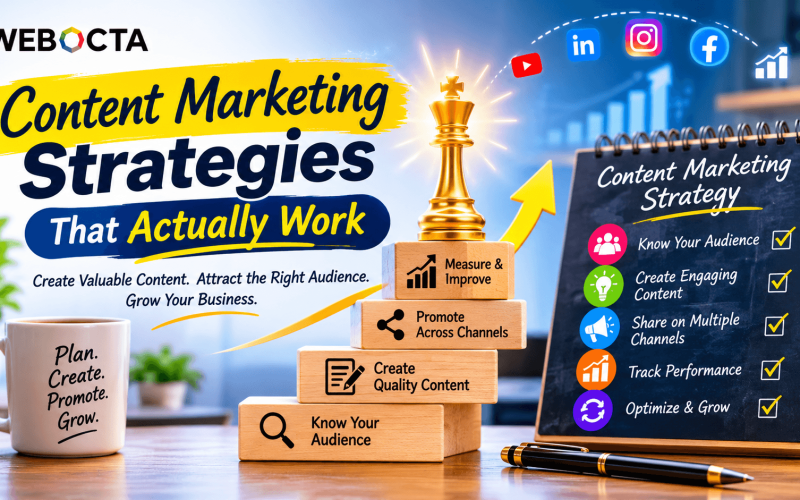
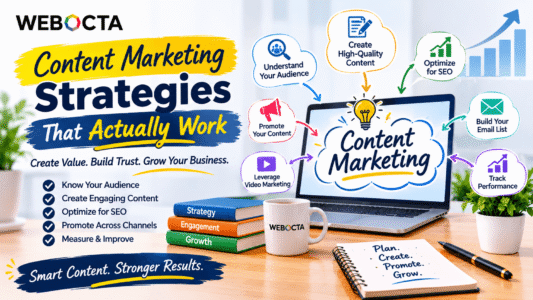
Content Marketing Strategies That Actually Work: A Complete Guide for Business Growth

Content marketing has become one of the most effective ways for businesses to attract potential customers, build brand awareness, and generate quality leads. In today’s competitive digital world, simply publishing content is not enough. Businesses need a well-planned content marketing strategy that delivers valuable information to the right audience at the right time.

Whether you run a small business, startup, or established company, the right content marketing approach can help you build trust, improve online visibility, and achieve long-term growth.

Let’s explore some effective content marketing strategies that actually work.

What Is Content Marketing?

Content marketing is a webocta.com/” target=”_blank”>digital marketing approach that involves creating and sharing valuable, relevant, and consistent content to attract and engage a clearly defined audience.

Instead of directly promoting products or services, content marketing focuses on educating, informing, and helping potential customers.

Common content marketing formats include:

Blog posts and articles
Social media posts
Videos and reels
Infographics
Email newsletters
Case studies and success stories
E-books and guides

A successful content marketing strategy focuses on providing value while naturally guiding potential customers toward your business.

1. Understand Your Target Audience

The first step toward successful content marketing is understanding your audience. Before creating content, identify who your potential customers are, what problems they face, and what information they are searching for online.

Research their interests, preferences, challenges, and online behavior.

For example, if your target audience consists of small business owners, you can create content about SEO, lead generation, website development, and social media marketing.

When you understand your audience, you can create content that connects with their needs and encourages engagement.

2. Create High-Quality and Valuable Content

Quality matters more than quantity in content marketing. Publishing multiple articles without providing useful information will not necessarily help your business grow.

Focus on creating original, informative, and engaging content that solves real problems.

Some effective content ideas include:

Step-by-step educational guides
Industry tips and insights
Frequently asked questions
Product and service comparisons
Customer success stories
Practical tutorials

Make your content easy to read by using short paragraphs, clear headings, relevant images, and practical examples.

3. Focus on SEO-Friendly Content

Search Engine Optimization (SEO) plays an important role in content marketing. SEO helps your content become more discoverable when people search for relevant information on Google and other search platforms.

Start with proper keyword research to identify the search terms your audience uses.

Important SEO practices include:

Using relevant primary and secondary keywords
Writing attractive SEO title tags
Creating compelling meta descriptions
Using proper H1, H2, and H3 headings
Adding relevant internal links
Optimizing images with descriptive alt text
Creating helpful, search-intent-focused content

Remember that keywords should be included naturally. Your primary goal should be to answer users’ questions rather than simply repeat search terms.

4. Use Social Media to Promote Your Content

Creating valuable content is only half the job. You also need to distribute it through channels where your audience spends time.

Social media platforms such as Facebook, Instagram, LinkedIn, and YouTube can help increase content visibility and encourage audience interaction.

For example, you can turn a detailed blog post into multiple social media posts, short videos, infographics, or carousel posts.

Maintain a consistent posting schedule and encourage people to comment, share, and interact with your content.

5. Invest in Video Marketing

Video marketing is an effective way to communicate information in an engaging and easy-to-understand format.

Many customers prefer watching videos to learn about products, services, and business solutions.

You can create:

Product demonstration videos
Educational tutorials
Customer testimonials
Behind-the-scenes videos
Short-form educational reels
Industry tips and expert interviews

Videos can be shared across your website, YouTube channel, and social media platforms to reach different audiences.

6. Build an Effective Email Marketing Strategy

Email marketing helps businesses maintain relationships with existing customers and nurture potential leads.

Build an email subscriber list by offering valuable resources such as free guides, newsletters, or useful industry updates.

Send personalized emails containing educational content, company updates, special offers, and helpful resources.

Avoid sending too many promotional emails. Focus on delivering relevant information that encourages subscribers to stay connected with your brand.

7. Use Content Repurposing

Creating fresh content regularly can require significant time and effort. Content repurposing allows you to get more value from the content you already have.

For example, one detailed blog post can be transformed into:

Five social media posts
One infographic
Two short videos
One email newsletter
One LinkedIn article

This approach helps maintain consistency across multiple marketing channels while reaching audiences with different content preferences.

8. Collaborate With Industry Experts

Collaborating with industry experts, influencers, and relevant businesses can help expand your brand’s reach.

Consider publishing expert interviews, guest articles, collaborative videos, and industry discussions.

These partnerships can introduce your business to new audiences, strengthen credibility, and create opportunities for valuable industry connections.

Choose collaborators whose audiences and expertise are relevant to your business.

9. Use Data and Analytics to Improve Performance

A successful content marketing strategy should be measured regularly.

Use tools such as Google Analytics 4 and Google Search Console to understand how your content performs.

Important metrics to monitor include:

Website traffic
Organic search clicks and impressions
Keyword performance
Engagement and conversions
Email open and click rates
Leads generated through content

Analyze the results to identify successful content formats and topics. Use these insights to improve your future content strategy.

10. Maintain Consistency and Update Old Content

Content marketing requires patience and consistency. Publishing one or two articles is unlikely to deliver sustainable results.

Create a realistic content calendar and publish valuable content regularly.

Also, review older blog posts to update outdated information, improve readability, add relevant keywords, and include useful internal links.

Keeping content accurate and relevant helps maintain its usefulness for readers.

Conclusion

Content marketing is more than creating blog posts or publishing social media updates. It is about building meaningful relationships with your audience through valuable, relevant, and engaging information.

By understanding your audience, creating high-quality content, implementing SEO, promoting content across multiple channels, and tracking performance, your business can develop a stronger online presence.

The best content marketing strategy focuses on delivering real value before asking for a sale.

Start implementing these strategies today to improve brand awareness, attract the right audience, generate quality leads, and support long-term business growth.

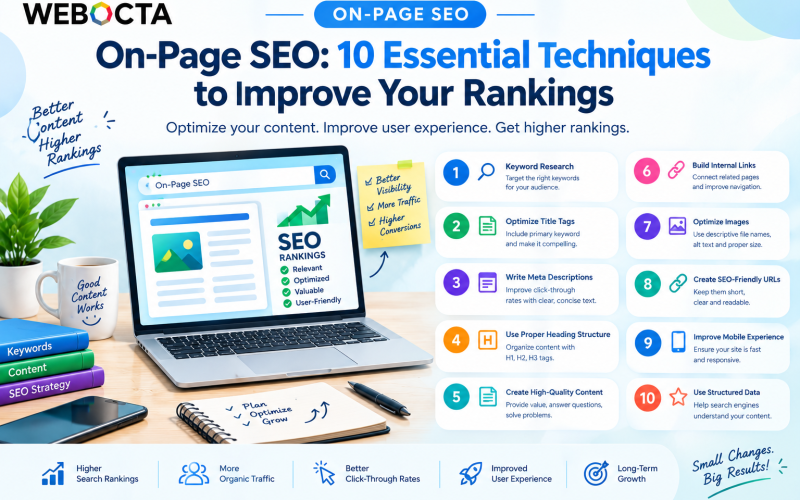
On-Page SEO_ 10 Essential Techniques

On-Page SEO: 10 Essential Techniques to Improve Your Rankings

Getting your website to appear prominently in search results requires more than simply publishing content. On-Page SEO is the process of optimizing the elements on your website so search engines can better understand your pages while providing visitors with a useful and engaging experience.

From keyword placement and title tags to internal linking and mobile usability, several factors can influence how effectively a webpage performs in organic search. Here are 10 essential On-Page SEO techniques every business should consider.

1. Start With Proper Keyword Research

Keyword research is the foundation of effective On-Page SEO. Before creating content, identify the words and phrases your target audience uses when searching for your products, services, or information.

Focus on keywords that are relevant to your business and match the user’s search intent. Instead of targeting only highly competitive broad keywords, consider specific long-tail keywords that can attract more qualified visitors.

For example, a digital marketing company might target phrases such as “digital marketing services for small businesses“ rather than focusing only on “digital marketing.”

Use your primary keyword naturally throughout the page without excessive repetition.

2. Optimize Your Title Tags

The title tag is one of the most important elements of an SEO-friendly webpage. It helps search engines understand the topic of your page and often appears as the clickable headline in search results.

Create a unique, descriptive title for every important page. Include your primary keyword naturally and make the title compelling enough to encourage users to click.

For example:

On-Page SEO: 10 Essential Techniques to Improve Your Rankings

A clear title immediately tells both search engines and visitors what the page is about.

3. Write Compelling Meta Descriptions

A meta description provides a short summary of a webpage. While it is not generally considered a direct ranking factor, a well-written description can help encourage clicks from search results.

Keep your description concise, relevant, and focused on the value the user will receive. Include the primary topic or keyword naturally and give users a reason to visit your page.

Avoid creating the same meta description for multiple pages.

4. Use a Clear Heading Structure

Headings make your content easier to read and help search engines understand the organization of your page.

Use one clear H1 heading for the main topic, followed by H2 and H3 headings to organize supporting sections.

For example:

  • H1: On-Page SEO Techniques
  • H2: Keyword Research
  • H2: Title Tag Optimization
  • H2: Internal Linking
  • H3: How Internal Links Help Users

A logical heading structure improves readability and makes long-form content easier to navigate.

5. Create Helpful, High-Quality Content

Content remains at the heart of successful SEO. Your pages should provide useful information that genuinely addresses the needs and questions of your target audience.

Avoid creating content simply to increase word count or insert keywords. Instead, explain concepts clearly, provide practical examples, answer common questions, and demonstrate relevant expertise.

For business websites, useful content can include guides, comparisons, tutorials, case studies, FAQs, and industry insights.

The goal should be simple: create content that users find valuable enough to read, trust, and share.

6. Build a Strong Internal Linking Strategy

Internal links connect one page of your website to another. They help visitors discover related information while helping search engines understand the relationships between pages on your site.

For example, a blog about On-Page SEO could link naturally to related pages about Technical SEO, keyword research, content marketing, and SEO services.

Use descriptive anchor text rather than generic phrases such as “click here.” A well-planned internal linking structure can also help users move through your website more easily.

7. Optimize Images

Images can make your content more engaging, but poorly optimized images can negatively affect website performance.

Use descriptive file names and appropriate alt text to help explain what an image represents. Compress images where appropriate and use suitable formats and dimensions to reduce unnecessary page weight.

For example, instead of naming an image IMG1234.jpg, use a descriptive name such as on-page-seo-techniques.jpg.

Alt text should describe the image naturally and should not be filled with unnecessary keywords.

8. Create SEO-Friendly URLs

A clean URL helps users and search engines understand what a webpage is about.

Keep URLs concise, descriptive, and relevant to the page topic. Avoid unnecessarily complicated URLs containing excessive numbers or parameters when a simpler structure is possible.

For example:

Good:
/on-page-seo-techniques/

Less useful:
/page?id=84729&category=seo

A consistent URL structure can also make your website easier to manage as it grows.

9. Improve Mobile Experience and Page Performance

A significant portion of web traffic comes from mobile devices, so your website should provide a smooth experience across different screen sizes.

Make sure pages are responsive, navigation is easy to use, text is readable, and interactive elements are accessible.

Page performance also matters. Slow-loading pages can create a poor user experience. Review factors such as image sizes, unnecessary scripts, caching, and other technical elements that may affect performance.

A fast, mobile-friendly website can help create a better overall experience for visitors.

10. Use Structured Data Where Appropriate

Structured data provides search engines with additional information about the content of a webpage. Depending on the page, structured data can describe elements such as articles, products, events, organizations, or frequently asked questions.

When implemented correctly and when eligible, structured data can help search engines better understand your content and may make pages eligible for certain enhanced search features.

However, structured data should accurately represent the visible content on your page and should follow applicable search engine guidelines.


Why On-Page SEO Matters

On-Page SEO is not about manipulating search engines. It is about making your website clearer, more useful, and easier to navigate.

When your keywords match search intent, your content answers users’ questions, your pages are well structured, and your website provides a good experience, you create a stronger foundation for organic search visibility.

It is also important to remember that On-Page SEO works together with Technical SEO and Off-Page SEO. A technically strong website with useful content and a credible online presence is better positioned for long-term organic growth.

Conclusion

Improving search rankings is an ongoing process rather than a one-time task. By implementing these 10 On-Page SEO techniques—from keyword research and title optimization to internal linking, image optimization, mobile usability, and structured data—you can create pages that are easier for search engines to understand and more valuable for your audience.

The best SEO strategy focuses on users first. Create helpful content, optimize important page elements, maintain a strong website structure, and continually improve the experience you provide. Over time, these efforts can contribute to better visibility, more qualified organic traffic, and sustainable online growth.

ChatGPT Image Sep 29, 2026, 03_41_26 PM (1)

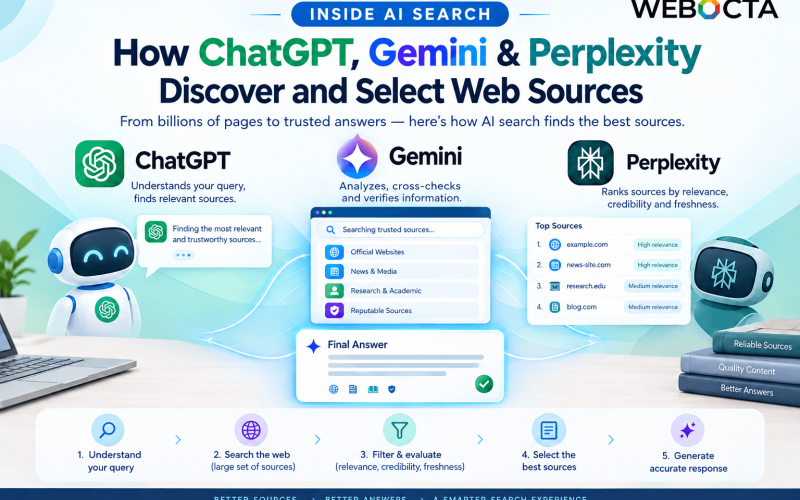
Inside AI Search: How ChatGPT, Gemini & Perplexity Discover and Select Web Sources

Search is changing rapidly. For years, businesses focused on ranking their websites on Google and other traditional search engines. Today, users are increasingly asking AI tools such as ChatGPT, Google Gemini, and Perplexity to research products, compare services, answer questions, and summarize information.

This creates a new question for businesses: How do AI search platforms discover and select the web sources they use in their answers?

Understanding this process can help marketers create content that is easier for AI systems to discover, understand, and potentially reference.

What Is AI Search?

AI search combines traditional information retrieval with artificial intelligence. Instead of simply presenting a list of links, AI-powered platforms can interpret a user’s question, retrieve relevant information, and generate a conversational response.

Different platforms use different technologies and workflows. Some AI experiences can search the web in real time, while others may use information from their underlying models, connected sources, or specialized retrieval systems.

This means there is no single universal “AI ranking algorithm.”

However, several common principles influence whether online information can be discovered and used.

How Does ChatGPT Discover Web Sources?

When web search is available, ChatGPT can search the internet to find information relevant to a user’s question. It may retrieve multiple webpages, evaluate the available information, and use relevant sources when generating its response.

For businesses, this means having a website that clearly explains what the company does, who it serves, and what information it provides can be important.

Content should be:

  • Clear and easy to understand
  • Relevant to specific user questions
  • Well structured
  • Factually accurate
  • Supported by trustworthy information
  • Regularly maintained when information changes

A page that directly answers a user’s question can be more useful than a page created primarily to repeat keywords.

How Does Google Gemini Find Information?

Google Gemini is integrated into Google’s broader ecosystem, and its search-related experiences can use information retrieved from the web.

Google’s search systems have long emphasized relevance, quality, usefulness, and technical accessibility. These principles remain important when creating content that may appear in AI-powered search experiences.

For example, a business publishing a detailed guide about local SEO should clearly explain concepts, use descriptive headings, answer common questions, and provide information that users can actually apply.

AI systems can then have clearer information to interpret when retrieving content.

How Does Perplexity Select Sources?

Perplexity is designed around an answer-focused search experience. It retrieves information from online sources and typically provides citations so users can examine where information came from.

This makes source quality particularly important.

If your website publishes original research, expert insights, statistics, case studies, or detailed educational content, those resources can potentially become useful references when an AI search system is researching a related topic.

However, appearing as a source is never guaranteed. AI systems can choose different sources depending on the user’s exact question, available information, freshness, relevance, and other factors.

What Makes a Website More Discoverable to AI Search?

Although AI platforms differ, several SEO fundamentals remain useful.

1. Create Helpful, Original Content

AI systems need information they can understand and use. Instead of producing large volumes of generic articles, focus on creating original, useful resources.

Include practical examples, explanations, statistics, case studies, and expert perspectives where appropriate.

2. Answer Specific Questions

Users increasingly ask detailed questions rather than searching for short keywords.

For example, instead of targeting only “SEO services,” create useful content around questions such as:

“How does local SEO help small businesses generate leads?”

Answer the question directly and provide supporting information throughout the article.

3. Build Topical Authority

A single article may not establish your expertise on an entire subject.

A digital marketing company, for example, could create connected content covering technical SEO, on-page SEO, local SEO, content marketing, keyword research, analytics, and AI search.

Internal links can help users and search engines understand the relationship between these topics.

4. Keep Information Accurate and Updated

AI search often deals with questions where information can change quickly.

Business details, product information, statistics, regulations, pricing, and technology developments should therefore be reviewed and updated when necessary.

Outdated information can reduce the usefulness of a page.

5. Make Your Website Easy to Understand

Technical SEO still matters.

Search engines and other systems need to access your website effectively. Make sure important pages are crawlable, mobile-friendly, reasonably fast, and logically structured.

Use descriptive page titles, headings, URLs, image alt text, and appropriate structured data where relevant.

6. Establish Trust and Credibility

Who created the content? What experience or expertise do they have? Is the information supported by reliable evidence?

Clearly identifying authors, businesses, sources, and relevant credentials can help users understand why they should trust the information.

AI Search Is Not a Replacement for SEO

One common misconception is that businesses now need to choose between SEO and AI optimization.

In reality, many of the fundamentals overlap.

High-quality content, strong technical foundations, clear website architecture, relevant topics, authoritative references, and a positive user experience remain valuable.

The difference is that marketers now need to think beyond traditional search-result rankings and consider how their content can become useful information within AI-generated answers.

How Businesses Can Prepare for AI Search

Businesses should begin by auditing their existing content.

Identify the questions your customers ask, then determine whether your website provides clear and authoritative answers. Update outdated articles, strengthen weak content, create original resources, and improve internal linking.

It is also useful to monitor how your brand appears across different AI search platforms. Because AI-generated results can vary based on the question, location, time, available sources, and other factors, a single observation should not be treated as a permanent ranking.

Conclusion

AI search is changing how people discover information online. ChatGPT, Gemini, and Perplexity can use different systems and sources, but businesses can improve their chances of being discoverable by focusing on the fundamentals: useful content, technical accessibility, clear information, topical expertise, accuracy, and credibility.

The future of search is not simply about ranking a webpage. It is increasingly about becoming a reliable source of information that search engines and AI systems can understand, retrieve, and potentially reference.

For digital marketers, this creates a broader opportunity: instead of optimizing content only for keywords, create resources that genuinely answer the questions your audience is asking.

ChatGPT Image Sep 16, 2026, 10_54_23 AM

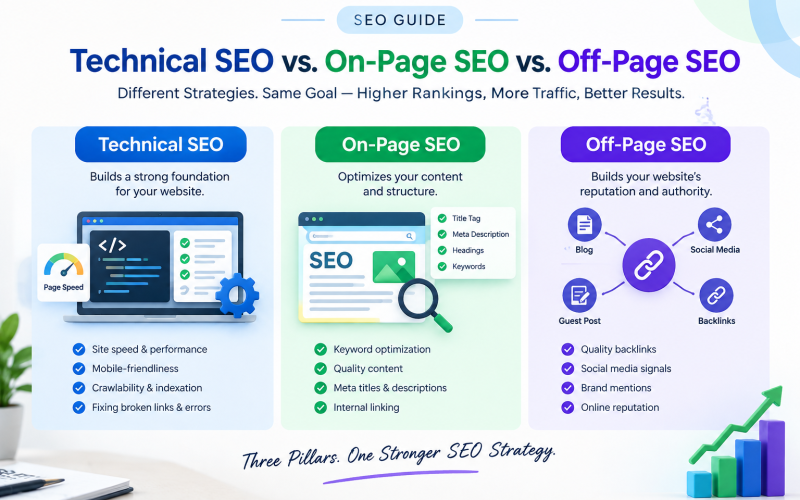
Technical SEO vs. On-Page SEO vs. Off-Page SEO

Search Engine Optimization (SEO) is one of the most important digital marketing strategies for businesses that want to improve their online visibility. However, SEO is not just about adding keywords to a website. A successful SEO strategy involves several different elements, including Technical SEO, On-Page SEO, and Off-Page SEO.

Although all three work toward the same goal—improving search engine visibility—they focus on different areas of your website and online presence. Understanding the difference can help businesses build a stronger SEO strategy and attract more relevant visitors.

What Is Technical SEO?

Technical SEO focuses on improving the technical foundation of your website so that search engines can crawl, understand, and index your pages effectively.

Technical SEO does not primarily deal with the content visitors read. Instead, it focuses on how well your website functions behind the scenes.

Important areas of Technical SEO include:

  • Website loading speed and performance
  • Mobile-friendliness
  • Website security and HTTPS
  • XML sitemap optimization
  • Robots.txt configuration
  • Crawlability and indexability
  • Fixing broken links and errors
  • Proper website architecture
  • Structured data and schema markup
  • Core Web Vitals

For example, if your website contains excellent content but loads very slowly on mobile devices, visitors may leave quickly. Technical improvements can create a better experience for users while also making it easier for search engines to access your website.

What Is On-Page SEO?

On-Page SEO refers to optimizing the content and elements that appear directly on your website. The purpose is to help search engines understand what each page is about while providing useful information to visitors.

Some important On-Page SEO factors include:

  • Keyword research and keyword placement
  • SEO-friendly title tags
  • Meta descriptions
  • Heading structure
  • High-quality and original content
  • Internal linking
  • Image optimization and alt text
  • URL structure
  • Search intent optimization

For example, if you operate a digital marketing company and create a page targeting the keyword “digital marketing services,” the page should provide useful information about those services. The primary keyword can be naturally incorporated into the title, headings, content, URL, and other relevant areas.

However, keyword usage should always feel natural. Simply repeating a keyword multiple times does not automatically make a page better. Search engines increasingly focus on helpful, relevant content that satisfies the user’s search intent.

What Is Off-Page SEO?

Off-Page SEO involves activities performed outside your website to build its authority, credibility, and online reputation.

One of the most well-known aspects of Off-Page SEO is link building. When reputable websites link to your content, those links can contribute to your website’s authority. However, quality is generally more important than simply obtaining a large number of links.

Common Off-Page SEO activities include:

  • Earning high-quality backlinks
  • Digital PR
  • Guest posting
  • Brand mentions
  • Online reputation management
  • Content promotion
  • Relevant business listings and citations
  • Social media promotion

For example, if an industry publication references your company’s research and links to your website, it can help increase your brand’s visibility and potentially strengthen your site’s authority.

Businesses should avoid manipulative link-building practices. The goal should be to earn relevant, trustworthy references rather than collecting links simply for quantity.

Technical SEO vs. On-Page SEO vs. Off-Page SEO

The easiest way to understand the difference is to think of SEO as a three-part system.

Technical SEO builds the foundation. It ensures that your website is technically accessible, fast, secure, and easy for search engines to crawl.

On-Page SEO improves what is actually on your website. It makes your content more relevant, understandable, and useful for both search engines and visitors.

Off-Page SEO builds your website’s reputation outside your own domain. It helps establish credibility through backlinks, mentions, digital PR, and other external signals.

These three areas should not be treated as completely separate strategies. They work together.

Why Do You Need All Three?

Imagine creating an attractive website with excellent content but ignoring technical problems. Search engines may have difficulty crawling or indexing important pages.

Now imagine having a technically perfect website with poor content. Visitors may not find the information they need, and the website may struggle to satisfy search intent.

Finally, consider a technically strong website with excellent content but little online authority. It may take longer to establish visibility in competitive search results.

A balanced SEO strategy addresses all three areas.

How to Create an Effective SEO Strategy

Start by performing a technical SEO audit to identify issues affecting website performance, crawlability, mobile usability, and indexing.

Next, review your website’s content. Conduct keyword research, understand your audience’s search intent, improve titles and headings, optimize internal links, and create genuinely useful content.

Finally, develop an Off-Page SEO strategy focused on earning relevant backlinks, promoting valuable content, building brand awareness, and establishing your business as a credible source within your industry.

SEO is not a one-time activity. Search algorithms, competitors, customer behavior, and your own website will continue to change. Regular monitoring and optimization are therefore essential.


Conclusion

Technical SEO, On-Page SEO, and Off-Page SEO are three essential parts of a complete SEO strategy. Technical SEO ensures that your website has a strong foundation, On-Page SEO improves the content and structure of your pages, and Off-Page SEO helps build authority and credibility.

Instead of focusing on only one area, businesses should take a balanced approach. When technical performance, valuable content, and online authority work together, your website is better positioned to attract relevant traffic, provide a positive user experience, and support long-term digital growth.

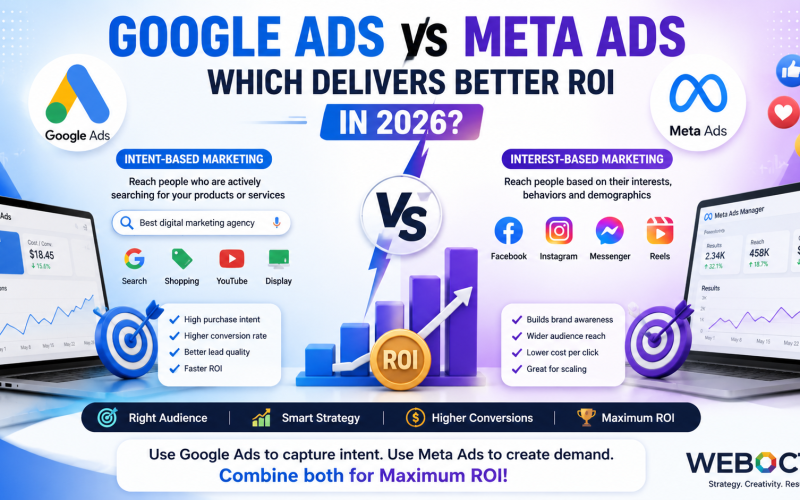
Google Ads vs Meta Ads comparison showing intent-based and interest-based advertising strategies to maximize ROI in 2026

Google Ads vs Meta Ads: Which Delivers Better ROI in 2026?

If you’re planning to invest in paid advertising, one of the biggest questions you’ll face is Google Ads vs Meta Ads: Which delivers better ROI? The answer isn’t as simple as choosing one platform over the other. Your return on investment depends on your business goals, target audience, industry, budget, and the stage of the customer journey you’re trying to influence.

Both Google Ads and Meta Ads have evolved significantly in 2026, introducing advanced AI-powered optimization, automated bidding, smarter audience targeting, and machine learning capabilities. While Google Ads captures users with high purchase intent through search, Meta Ads excel at creating demand, building brand awareness, and driving engagement across Facebook, Instagram, Messenger, and Audience Network.

After managing campaigns across multiple industries—including e-commerce, SaaS, healthcare, education, manufacturing, and service-based businesses—one insight remains consistent: the highest ROI comes from using the right platform for the right objective, not simply choosing the most popular one.

In this comprehensive guide, you’ll learn how each platform works, where each performs best, and how to maximize your advertising budget for measurable business growth.

What is Google Ads?

Google Ads is Google’s online advertising platform that enables businesses to display advertisements across:

  • Google Search
  • Google Shopping
  • YouTube
  • Gmail
  • Google Display Network
  • Google Discover
  • Google Maps
  • Partner Websites

Unlike traditional advertising, Google Ads reaches users who are actively searching for a product or service.

For example: Someone searches

“Best Digital Marketing Agency in Kolkata“

or

“Buy Running Shoes Online“

These users already have purchase intent.

This is known as Intent-Based Marketing.

Because users are already looking for solutions, Google Ads often delivers:

  • Higher conversion rates
  • Better lead quality
  • Faster sales
  • Stronger ROI for service businesses

Types of Google Ads Campaigns

Google offers multiple campaign types:

Search Campaigns

Appear directly in Google Search Results.

Best for:

  • Lawyers
  • Doctors
  • Real Estate
  • Agencies
  • SaaS
  • Local Businesses

Performance Max

Uses Google’s AI to automatically optimize ads across all Google properties.

Best for:

  • Ecommerce
  • Retail
  • Lead Generation
  • Multi-channel marketing

Shopping Ads

Perfect for ecommerce businesses selling physical products.

Display Ads

Banner advertisements appearing on millions of websites.

Ideal for:

  • Brand Awareness
  • Remarketing
  • Product Launches

YouTube Ads

Video advertisements shown before or during YouTube videos.

Excellent for:

  • Brand Building
  • Product Demonstrations
  • Educational Content

What is Meta Ads?

Meta Ads is Meta’s advertising platform that allows businesses to advertise across:

  • Facebook
  • Instagram
  • Messenger
  • Audience Network
  • Reels
  • Stories

Unlike Google, Meta focuses on Interest-Based Marketing.

Instead of waiting for users to search, Meta helps businesses discover potential customers based on their interests, online behaviors, demographics, and engagement patterns.

For example,

Someone may not search for

“Running Shoes”

But Meta knows they:

  • Follow fitness pages
  • Watch marathon videos
  • Purchase sports products
  • Engage with workout content

Meta will proactively display relevant ads before users even realize they need the product.

This demand-generation capability makes Meta one of the most effective platforms for awareness and consideration campaigns.

Types of Meta Ads

Meta offers multiple campaign objectives:

Awareness Campaigns

Increase brand visibility among new audiences.

Traffic Campaigns

Drive visitors to websites or landing pages.

Engagement Campaigns

Increase likes, comments, shares, and post interactions.

Lead Generation Campaigns

Capture customer information directly within Facebook or Instagram using instant forms.

Sales Campaigns

Optimize for:

  • Purchases
  • Add to Cart
  • Checkout
  • Conversions

App Promotion

Designed specifically for mobile application installs.

Google Ads vs Meta Ads: The Core Difference

Although both platforms help businesses acquire customers, they approach advertising in fundamentally different ways.

Feature Google Ads Meta Ads
User Intent High Medium
Marketing Type Intent-Based Intent-Based
Customer Journey Bottom Funnel Top & Middle Funnel
Purchase Readiness Very High Medium
Best For Leads & Sales Brand Awareness & Demand Generation
Search Required Yes No
AI Optimization Excellent Excellent
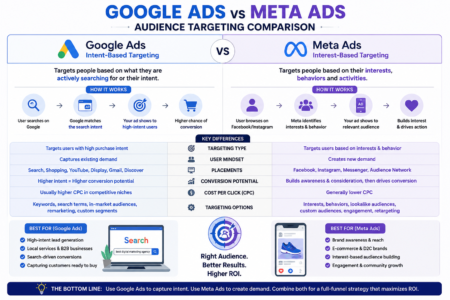
Comparison of Google Ads intent-based targeting and Meta Ads interest-based targeting

Think of it this way:

Google Ads

A customer says:

“I need this product right now.”

Google simply connects the customer with the best solution.

Meta Ads

Meta tells users:

“You might like this product.”

The platform creates interest before the customer actively searches.

Understanding User Intent

One of the biggest factors influencing ROI is user intent.

Imagine two people.

Person A

Searches:

“Emergency plumber near me”

This person needs immediate help.

They’re highly likely to convert.

Google Ads performs exceptionally well in this scenario because it captures users at the moment of need.

Person B

Is casually browsing Instagram.

They see an ad for a smart home device.

They weren’t planning to buy it, but the creative catches their attention.

They click, explore, and eventually make a purchase.

This is where Meta Ads shines—by creating demand through compelling visuals and precise audience targeting.

Why Intent Matters for ROI

Higher intent often means:

  • Higher conversion rates
  • Lower customer acquisition costs
  • Faster sales cycles
  • Better lead quality

However, businesses that rely on visual storytelling, impulse purchases, or brand discovery can achieve exceptional ROI with Meta Ads, especially when paired with effective retargeting.

Audience Targeting: Google Ads vs Meta Ads

One of the biggest differences between Google Ads and Meta Ads is how each platform identifies and reaches potential customers. While both offer advanced AI-powered targeting, they rely on different signals to find the right audience.

Google Ads Targeting

Google Ads primarily targets users based on search intent. It analyzes what people are actively looking for and displays ads when their queries match your keywords or audience settings.

Targeting options include:

  • Keyword Targeting
  • Location Targeting
  • Device Targeting
  • Demographic Targeting
  • In-Market Audiences
  • Custom Segments
  • Remarketing Lists
  • Customer Match
  • Performance Max AI Audience Signals

Best for:

  • Local businesses
  • B2B companies
  • Service providers
  • High-intent lead generation
  • Emergency services

Meta Ads Targeting

Meta Ads focus on discovering potential customers based on interests, online behavior, and engagement across Meta’s ecosystem.

Targeting options include:

  • Interest-Based Audiences
  • Behavioral Targeting
  • Custom Audiences
  • Lookalike Audiences
  • Website Retargeting
  • Video View Audiences
  • Instagram Engagement Audiences
  • Facebook Page Engagement
  • Advantage+ Audience

Best for:

  • E-commerce brands
  • Fashion
  • Beauty
  • Fitness
  • Lifestyle products
  • Mobile apps
  • D2C businesses

Expert Insight: While Google Ads captures existing demand, Meta Ads excel at creating new demand by introducing products to users who may not yet be searching for them.

Google Ads vs Meta Ads: Cost Comparison

Advertising costs vary by industry, competition, audience, and campaign quality. Understanding these differences can help you allocate your budget more effectively.

Metric Google Ads Meta Ads
Average CPC Higher Lower
Average CPM Moderate Lower
Lead Quality Very High High
Purchase Intent High Medium
Brand Awareness Good Excellent
Remarketing Excellent Excellent

When Google Ads Costs More

Highly competitive industries such as legal services, insurance, finance, healthcare, and software often experience higher Cost Per Click (CPC) because many advertisers compete for the same high-value keywords.

However, these clicks often produce stronger leads because users already have purchase intent.

When Meta Ads Are More Cost-Effective

Meta Ads generally provide lower costs for:

  • Brand awareness
  • Engagement
  • Video views
  • Social interaction
  • Product discovery

Businesses looking to build a large audience or introduce new products often benefit from Meta’s lower advertising costs.

ROI Comparison: Which Platform Performs Better?

The answer depends on your business goals rather than the platform itself.

Choose Google Ads If Your Goal Is:

✔ Lead Generation

✔ High-intent customers

✔ Local services

✔ Emergency services

✔ B2B marketing

✔ SaaS

✔ Healthcare

✔ Legal services

✔ Education

✔ Home services

Why?

People searching on Google are actively looking for a solution. This often leads to:

  • Higher conversion rates
  • Better lead quality
  • Faster purchasing decisions
  • Strong Return on Investment (ROI)

Choose Meta Ads If Your Goal Is:

✔ Brand Awareness

✔ E-commerce

✔ Fashion

✔ Beauty

✔ Consumer products

✔ Product launches

✔ Community building

✔ App installs

✔ Influencer campaigns

Why?

Meta excels at visual storytelling and audience discovery. Creative images, videos, and Reels can inspire purchases even before customers begin searching.

Google Ads vs Meta Ads for Different Industries 

Industry Recommended Platform
Digital Marketing Agency Google Ads
Real Estate Google Ads
Law Firms Google Ads
Hospitals & Clinics Google Ads
Local Businesses Google Ads
SaaS Google Ads
Manufacturing Google Ads
E-commerce Google Ads + Meta Ads
Fashion Meta Ads
Beauty & Cosmetics Meta Ads
Restaurants Google Ads + Meta Ads
Fitness Brands Meta Ads
Educational Institutes Google Ads + Meta Ads

Should You Use Both Platforms Together?

In many cases, the strongest marketing strategy is not choosing one platform over the other—it’s combining them to guide customers through the entire buying journey.

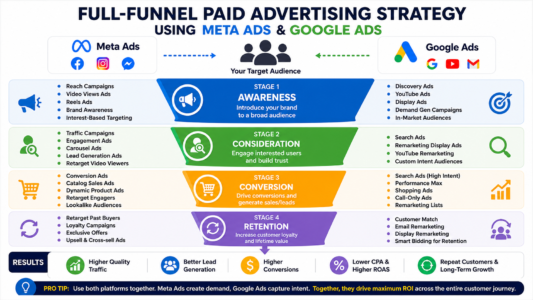
Full-funnel paid advertising strategy using Meta Ads and Google Ads

Example Funnel

Stage 1 – Awareness

Use Meta Ads to introduce your brand with engaging videos, Reels, or carousel ads.

↓

Stage 2 – Consideration

Retarget interested users with testimonials, product benefits, or educational content.

↓

Stage 3 – Conversion

Capture high-intent searches using Google Ads when prospects actively look for your product or service.

↓

Stage 4 – Retention

Use remarketing campaigns on both platforms to encourage repeat purchases and customer loyalty.

This full-funnel approach often delivers stronger long-term ROI than relying on a single advertising channel.

Pros and Cons

Google Ads

Pros

  • Captures high-intent searches
  • Excellent for lead generation
  • Fast conversion potential
  • Strong local targeting
  • Effective for B2B marketing
  • Robust analytics and conversion tracking
  • Extensive ad placements across Google properties

Cons

  • Higher CPC in competitive industries
  • Requires keyword research
  • Learning curve for campaign optimization
  • Limited ability to generate demand for unknown products

Meta Ads

Pros

  • Outstanding audience targeting
  • Lower advertising costs for awareness campaigns
  • Strong visual advertising formats
  • Excellent for brand building
  • Powerful retargeting options
  • Effective for impulse purchases

Cons

  • Lower purchase intent compared to search advertising
  • Creative fatigue can reduce performance over time
  • Frequent testing is required to maintain results
  • Privacy changes may affect audience tracking

Expert Recommendations

Based on years of managing campaigns across multiple industries, here are practical recommendations:

  • Local service businesses (plumbers, dentists, agencies, consultants) should prioritize Google Ads to capture users actively seeking solutions.
  • E-commerce brands should combine Meta Ads for product discovery with Google Ads for branded and shopping searches.
  • Startups can use Meta Ads to build awareness while gradually adding Google Ads as search demand grows.
  • B2B companies often achieve better lead quality through Google Search campaigns supported by LinkedIn or Meta remarketing.
  • Established brands typically benefit from a balanced strategy that leverages both platforms throughout the customer journey.

Frequently Asked Questions

Q1. Which platform offers a better ROI: Google Ads or Meta Ads?

There is no universal winner. Google Ads generally delivers higher ROI for businesses targeting users with immediate purchase intent, while Meta Ads often provide better ROI for brand awareness, product discovery, and visual consumer products.

Q2. Is Google Ads more expensive than Meta Ads?

In many industries, Google Ads have a higher average CPC due to intense competition. However, the higher cost can be justified by stronger lead quality and higher conversion rates.

Q3. Are Meta Ads suitable for B2B marketing?

Yes, but they are most effective for awareness, retargeting, employer branding, and lead nurturing. Google Ads typically perform better for capturing high-intent B2B searches.

Q4. Can small businesses use both platforms?

Absolutely. Even with a modest budget, combining Meta Ads for awareness and Google Ads for conversions can produce a balanced and scalable marketing strategy.

Q5. Which platform is better for e-commerce?

For most online stores, using both platforms delivers the best results. Meta Ads help generate demand through engaging creatives, while Google Ads capture users ready to purchase through Search and Shopping campaigns.

Conclusion

When comparing Google Ads vs Meta Ads, the most important takeaway is that the right platform depends on your business objectives, audience, and sales funnel.

If your priority is capturing customers who are actively searching for your products or services, Google Ads is often the stronger choice. If your goal is to increase brand awareness, introduce new products, or engage users through compelling visuals, Meta Ads can deliver exceptional value.

For many businesses, the highest return on investment comes from integrating both platforms into a cohesive strategy—using Meta Ads to generate interest and Google Ads to convert that interest into measurable results.

Regular testing, accurate conversion tracking, high-quality landing pages, and continuous campaign optimization are essential regardless of the platform you choose. By focusing on user intent, audience relevance, and data-driven decisions, you can maximize your advertising budget and achieve sustainable growth.

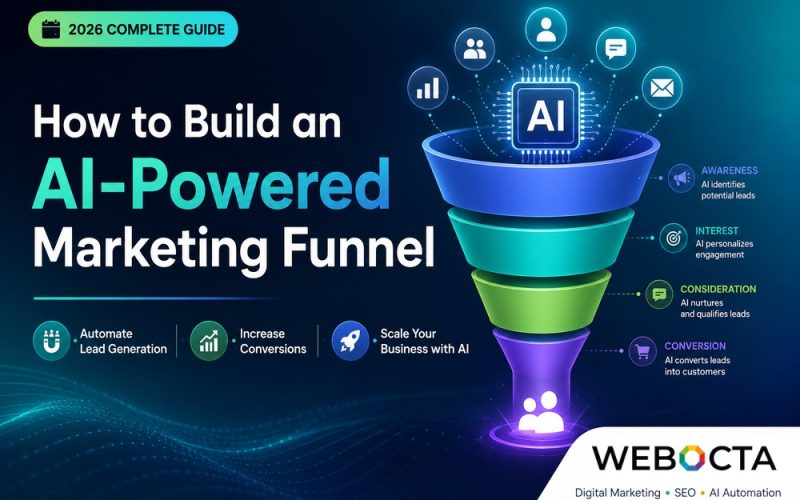
How to Build an AI-Powered Marketing Funnel to automate lead generation, increase conversions, and scale business growth with AI.

How to Build an AI-Powered Marketing Funnel: The Complete Guide to Automating Lead Generation & Sales in 2026

Artificial Intelligence (AI) has transformed how businesses attract, engage, and convert customers. Instead of relying on manual marketing tasks, companies are now using AI-powered marketing funnels to automate lead generation, personalize customer experiences, improve conversion rates, and increase ROI.

Whether you’re a startup, an established business, or a digital marketing agency, implementing an AI marketing funnel can streamline your marketing operations while delivering better customer experiences.

In this comprehensive guide, you’ll learn how to build an AI-powered marketing funnel from scratch, discover the best AI marketing tools, and explore proven strategies to generate more qualified leads and sales.

What Is an AI-Powered Marketing Funnel?

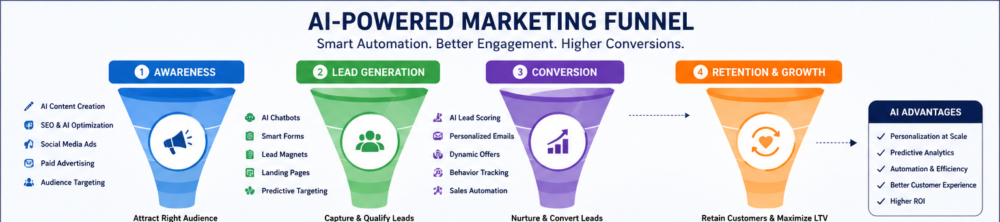
AI-powered marketing funnel showing awareness, lead generation, conversion, and retention stages

An AI-powered marketing funnel is a customer acquisition system that uses Artificial Intelligence, machine learning, predictive analytics, and marketing automation to guide potential customers from awareness to purchase—and beyond.

Unlike traditional marketing funnels that require manual intervention, AI automates repetitive tasks such as:

  • Customer segmentation
  • Lead scoring
  • Email automation
  • Personalized recommendations
  • AI chatbot conversations
  • Sales forecasting
  • Customer journey optimization

The result is a smarter, faster, and more efficient AI sales funnel that improves customer engagement while reducing marketing costs.

Why AI Is Changing Marketing Funnels

Today’s customers expect personalized experiences across every touchpoint. AI makes this possible by analyzing user behavior in real time and delivering relevant content, offers, and recommendations.

Key Benefits of AI Marketing Automation

  • Automates repetitive marketing tasks
  • Improves customer engagement
  • Generates better-quality leads
  • Reduces customer acquisition costs
  • Increases conversion rates
  • Provides predictive insights
  • Enhances customer personalization
  • Supports 24/7 customer interactions using AI chatbots

Businesses adopting AI marketing automation gain a competitive advantage by making faster, data-driven decisions while improving customer satisfaction.

The 5 Stages of an AI-Powered Marketing Funnel

Stage 1: Awareness

The first step is attracting potential customers.

Use AI to:

  • Generate SEO-optimized content
  • Create blog articles
  • Schedule social media posts
  • Optimize Google Ads
  • Analyze trending keywords
  • Improve content recommendations

Recommended AI Tools

  • ChatGPT
  • Gemini AI
  • Claude AI
  • Perplexity AI
  • Surfer SEO
  • Semrush AI

Content marketing, SEO, and paid advertising remain essential for building awareness, while AI enhances efficiency and scalability.

Stage 2: Interest & Lead Generation

Once visitors land on your website, the goal is capturing qualified leads.

Effective lead generation methods include:

  • AI-powered chatbots
  • Smart contact forms
  • Lead magnets
  • Interactive quizzes
  • Personalized landing pages

AI can instantly identify visitor intent and recommend relevant services or content.

For example, a visitor searching for SEO services may automatically receive a downloadable SEO checklist or consultation offer.

Stage 3: Consideration

During this stage, prospects compare your business with competitors.

AI helps by providing personalized experiences through:

  • Automated email sequences
  • Product recommendations
  • Personalized website content
  • CRM automation
  • Lead scoring
  • Customer segmentation

This improves engagement and nurtures prospects until they’re ready to buy.

Stage 4: Conversion

This is where AI maximizes sales opportunities.

AI-powered conversion strategies include:

  • Dynamic pricing
  • Personalized offers
  • AI sales assistants
  • Automated follow-ups
  • Predictive analytics
  • Smart scheduling

Businesses using AI often reduce abandoned inquiries through automated reminders and personalized communication.

Stage 5: Retention & Growth

A successful marketing funnel doesn’t end after the sale.

AI improves customer retention through:

  • Email automation
  • Loyalty campaigns
  • Customer satisfaction surveys
  • AI-powered support
  • Upselling
  • Cross-selling

Returning customers are typically more profitable than acquiring new ones, making retention a critical part of any marketing strategy.

How to Build an AI Marketing Funnel

Step 1: Define Your Ideal Customer

Understand:

  • Demographics
  • Pain points
  • Goals
  • Buying behavior
  • Preferred communication channels

AI tools can analyze historical customer data to identify high-value audiences.

Step 2: Create High-Quality Content

Publish:

  • Blogs
  • Videos
  • Case studies
  • Guides
  • Landing pages

Optimize every page for SEO while answering real customer questions.

Content should demonstrate experience, expertise, authority, and trustworthiness (EEAT).

Step 3: Capture Leads

Offer valuable resources such as:

  • Free audits
  • Templates
  • Checklists
  • Consultations
  • Industry reports

Use AI chatbots to engage visitors and answer questions instantly.

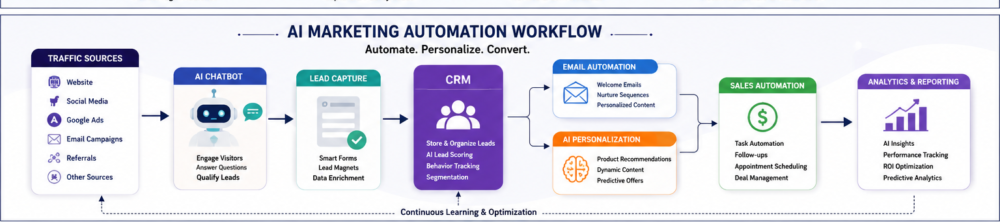
AI marketing automation workflow using CRM, chatbot, and email automation

Step 4: Automate Lead Nurturing

Build automated workflows using:

  • Email marketing
  • CRM automation
  • Lead scoring
  • Personalized content

Platforms like HubSpot AI and Salesforce AI help businesses manage prospects more efficiently.

Step 5: Analyze & Optimize

Track KPIs such as:

  • Conversion rate
  • Cost per lead
  • Customer acquisition cost
  • Return on investment
  • Bounce rate
  • Email open rate

AI identifies patterns that help improve future campaigns.

Best AI Marketing Tools in 2026

Content Creation

  • ChatGPT
  • Gemini AI
  • Claude AI

SEO

  • Surfer SEO
  • Semrush
  • Ahrefs

Marketing Automation

  • HubSpot AI
  • ActiveCampaign
  • Zapier
  • Make.com

CRM

  • HubSpot CRM
  • Salesforce AI
  • Zoho CRM

Analytics

  • Google Analytics 4
  • Looker Studio
  • Microsoft Clarity

Choosing the right combination of tools depends on your business goals, budget, and marketing maturity.

AI Marketing Funnel Example

Imagine a web design agency targeting small businesses.

  1. A prospect searches “website design company.”
  2. They discover an SEO-optimized blog.
  3. An AI chatbot offers a free website audit.
  4. The visitor submits their email.
  5. An automated email sequence shares case studies and testimonials.
  6. AI scores the lead based on engagement.
  7. A consultation is booked automatically.
  8. The sales team closes the deal.
  9. Post-sale emails encourage referrals and additional services.

This automated workflow saves time while increasing conversion rates.

AI customer journey mapping for personalized marketing experiences

Common Mistakes to Avoid

  • Relying entirely on AI without human review
  • Ignoring customer privacy and data security
  • Publishing low-quality AI-generated content
  • Using too many disconnected tools
  • Failing to measure campaign performance
  • Neglecting SEO fundamentals
  • Not updating workflows regularly

AI should enhance human expertise—not replace it.

Future Trends in AI Marketing

Businesses should prepare for:

  • AI agents handling customer interactions
  • Predictive customer behavior modeling
  • Hyper-personalized marketing
  • Voice search optimization
  • Conversational AI
  • AI-powered video creation
  • Automated campaign optimization
  • Advanced customer journey mapping

Companies that embrace these trends will be better positioned to compete in the evolving digital landscape.

Frequently Asked Questions

Q1. What is an AI-powered marketing funnel?

An AI-powered marketing funnel uses artificial intelligence to automate customer acquisition, lead nurturing, and conversion processes.

Q2. Can AI generate leads?

Yes. AI helps identify high-intent audiences, personalize outreach, and automate lead qualification.

Q3. Which AI tools are best for marketing?

Popular options include ChatGPT, Gemini AI, Claude AI, HubSpot AI, Salesforce AI, Semrush, Ahrefs, and Zapier.

Q4. Is AI marketing suitable for small businesses?

Absolutely. Many AI tools are affordable and help small businesses automate repetitive tasks, improve customer engagement, and increase efficiency.

Q5. What is the difference between AI automation and marketing automation?

Marketing automation follows predefined rules, while AI automation learns from data, predicts outcomes, and personalizes experiences in real time.


Final Thoughts

Building an AI-powered marketing funnel is no longer optional for businesses that want to scale efficiently. By combining AI marketing automation, customer journey mapping, CRM automation, SEO, and conversion optimization, organizations can attract better leads, deliver personalized experiences, and achieve sustainable growth.

At Webocta, we help businesses implement data-driven digital marketing strategies that combine AI with proven SEO, PPC, website development, and marketing automation practices. Whether you’re looking to optimize lead generation, improve conversion rates, or build an end-to-end AI marketing funnel, our team can help you create scalable solutions tailored to your business goals.

Ready to Build an AI-Powered Marketing Funnel?

If you’re looking to automate your marketing, generate more qualified leads, and grow your business faster, Webocta can help. Our team specializes in SEO, AI-powered marketing automation, Google Ads, Meta Ads, website design, and conversion-focused digital strategies.

Contact Webocta today for a personalized consultation and discover how AI can transform your marketing performance.